


Banking & Bills
No Excel experience needed • Automatic protection • Zero technical setup
Update your bank transactions in about a minute. LifeLedger Pro automatically matches every payment to your bills, flags suspicious charges, and keeps your balance perfectly accurate - all without ever connecting to your bank.
Explore this page:
60-Second Import •
Bill Matching •
Balance Accuracy •
FREE FOR LIFE (v1) for Beta Testers
No Credit Card Required •
Uninstall Anytime
 60-Second Transaction Import - Zero Bank Connections

Forget apps that demand your bank login. LifeLedger Pro works smarter. You download your own transaction file (just like checking your statement), and Excel does the rest. No passwords shared. No security risks. No cloud storage.
The whole update takes about a minute. Guided pop-ups walk you through each step - sign in to your bank's website, download your transactions file, and come back to LifeLedger Pro. LifeLedger Pro finds the file automatically (even if you saved it somewhere unusual), imports everything, removes duplicates, and matches every transaction to your bills.
Within seconds, you see which bills are paid, which are due now (red), and which charges are new or suspicious (red alerts). Your balance updates automatically. Your payment history organizes itself. And everything stays completely private on your computer.
Unlike apps that sync with your bank or require cloud access, LifeLedger Pro processes everything locally Read more...
 Automatic Bill Matching & Real-Time Status Updates

The moment your transactions import, LifeLedger Pro springs into action. It matches every bank charge to its corresponding bill, highlights what has been paid, flags what is due, and alerts you to anything unusual.
Even if you have never used Excel before, the guided setup makes this effortless. Friendly pop-ups walk you through each step in plain English - no technical jargon, no complicated instructions. You simply follow along, and LifeLedger Pro handles all the complex work behind the scenes.
When you click the red 'ADD MY OWN INFO' button, LifeLedger Pro walks you through adding the financial account you pay most of your bills with and bringing in its transactions. It takes about 10 minutes. To add a bill, start typing the vendor's name: LifeLedger Pro shows that vendor's transactions, marks the best matches, and fills in the details for you. You can also set bills that come due in certain months only - perfect for seasonal services or premiums that don't follow the calendar quarters.
The 'Banking & Bills' page updates with every transaction update - bills grouped weekly, monthly, quarterly, twice yearly and once yearly, each with a summary like "18 of 19 paid". A bill you pay yourself turns red when it's coming due and stays red until it's paid. New or unusual charges show up in 'Alerts'. For bills that don't follow standard patterns - like property taxes due in April and October, or seasonal services active only March through November - LifeLedger Pro lets you specify exactly which months to monitor, eliminating false alerts for inactive periods.
No manual entry. No hunting through statements. No wondering if a bill got paid. Read more...
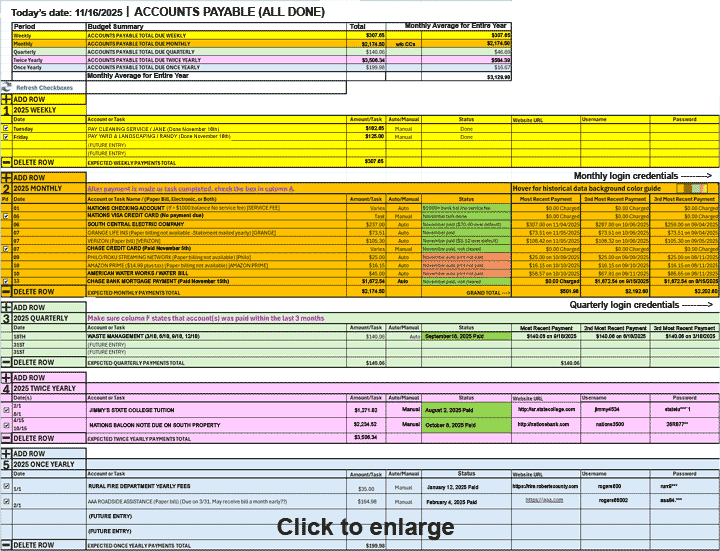
Download your recent transactions, and watch the 'Banking & Bills' page update in about a minute.
See It In Action!
FREE FOR LIFE (v1) • Limited Beta Spots • Launching Soon • No Credit Card Needed
No Excel experience needed • Automatic protection • Zero technical setup
 Perfect Balance Accuracy - Even When Banks Change

Your balance stays perfectly synchronized with your bank - automatically. Every update brings your balance up to date with what has posted at your bank. (Pending charges show once they post and you update again.)
On rare occasions, banks make small adjustments (international fees, corrections) that are not itemized in your download. When this happens, simply click Adjust Bank Balance, enter the difference, and LifeLedger Pro records it for you - clearly documented in your transaction history.
Switching banks? No problem. Add the new financial account with Add or Delete a Financial Account, then click Change Primary Financial Acct You Pay Bills With on the 'More Banking & Bills Tools' page and your bills move over. Your old transactions stay fully searchable. You can track up to 12 financial accounts: checking, savings, credit cards and loans. Whether your bank issues a quiet Read more...

One-click adjustments, fully documented
Ready to Automate Your Bill Tracking?
FREE FOR LIFE (v1) • Limited Beta Spots • Launching Soon • No Credit Card Needed
No Excel experience needed • Automatic protection • Zero technical setup