


Mobile Companion
Your essential info, always with you
Take your bills, tasks, contacts, and account balances with you on any phone. One-click export creates a simple file you email to yourself. No app download, no cloud storage, no internet connection needed once it's on your phone.
Explore this page:
How It Works • What You Access • Privacy & Offline • FREE FOR LIFE (v1) for Beta Testers
 How It Works - One-Click Export, Email to Yourself
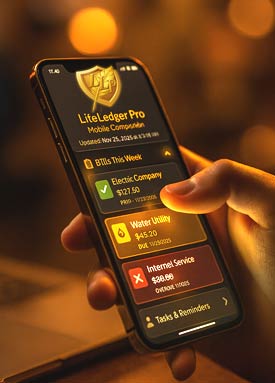
Click one button in LifeLedger Pro and a file is made with your current bills and balance, tasks, contacts and online accounts. Email it to yourself. Open it on your phone. Done in 30 seconds.
The file is a regular HTML page - the same technology websites use - so it works on any phone (iPhone, Android) without downloading apps or creating accounts. Just open it in your phone's browser.
First Time Setup: Open the 'Mobile Companion' page from the 'LifeLedger Pro Home' page and click 'Export to Mobile Companion'. The file saves to your Desktop as LifeLedger-Mobile.html. Right after that, click 'Email It to Me' (with Outlook the email opens with the file attached). Open that email on your phone, tap the file, and create a shortcut on your home screen for instant access. (Detailed step-by-step instructions are available on our Support page.)
Updates: Click the same button and email the new copy to yourself. On your phone, always open it from the newest email - the file name stays the same. It never updates by itself, so nothing is ever synced or uploaded.
The file shows a timestamp at the top so you always know you're looking at current information. Everything is completely self-contained - all information, formatting, and images embedded directly inside. No external links, no dependencies, nothing to break.
 What You Can Access on Your Phone

Your Mobile Companion gives you instant access to everything you need while on the go:
Your Bills - What's paid and what's due, plus your balance.
Tasks & Reminders - Maintenance, appointments, renewals - what's due and when.
Trusted Contacts - The phone numbers you need, one tap away. Doctor, plumber, insurance agent, family members.
Online Accounts - Your websites and usernames, with passwords partly hidden.
Survivor Tasks and the Cash Flow Planner - Survivor tasks once a date of death is entered, and the Cash Flow Planner if you choose to include it.
Formatted for mobile viewing - Large text, simple layout, no horizontal scrolling. Works completely offline once downloaded.
Real-world scenarios: Check if a bill is paid while shopping. Pull up your mechanic's number when your car breaks down. Verify account balances before a major purchase. Review your weekend task list over coffee. Access everything even during power outages - your phone works, and so does your Mobile Companion.
Your Essential Info in Your Pocket
FREE FOR LIFE (v1) • Limited Beta Spots • Launching Soon • No Credit Card Needed
 Complete Privacy - Works Forever, Even Offline

Your Mobile Companion offers privacy other systems cannot match. It's a self-contained file on your phone - not a cloud service, not a web app, not a server connection. Your information never leaves your control.
No servers. No uploads. No accounts. When you export your Mobile Companion, the file is created locally on your computer. When you email it to yourself, it travels through your email provider like any attachment. Once it's on your phone, nothing gets uploaded to LifeLedger Pro servers because we don't have any servers storing your data.
Works completely offline. Airplane mode? Works fine. No cell service? Still works. Power outage knocked out your router? Your phone still shows everything. The file runs entirely on your device - no external dependencies whatsoever.
Even if our website disappears tomorrow, your Mobile Companion keeps working forever. Everything is embedded directly inside - images, formatting, functionality. There are no links back to our website, no external resources. Nothing can break because there's nothing external to rely on.
Security on your phone: Your Mobile Companion is as secure as any other file on your device. Passwords are partly hidden, and if you replace a few characters of a password with asterisks in LifeLedger Pro, only you know them. Use a strong phone lock.
What your Mobile Companion never contains: Bank sign-in details - LifeLedger Pro never asks for them. It shows bill information and balances - useful for you, but not for anyone trying to access your accounts.
This is privacy by design, not privacy by promise. We can't access your data - neither your desktop LifeLedger Pro nor your Mobile Companion - even if we wanted to, because your financial information never reaches us. LifeLedger Pro keeps your information on your own computer. When you want mobile access, LifeLedger Pro exports an HTML file directly to your computer, and you email it to yourself. At no point does your data pass through our servers, touch the cloud, or leave your control.
Ready to Take Your Info Anywhere?
FREE FOR LIFE (v1) • Limited Beta Spots • Launching Soon • No Credit Card Needed