


Coming soon: your chance to become a Founding Member
Join the LifeLedger Pro Beta Testing Program
Download for Free!!
No Excel experience needed • Automatic protection • Zero technical setup
LifeLedger Pro will be entering Beta Testing soon. Bookmark this page and check back to become a Founding Member when our pre-release beta opens. This rare opportunity gives you FREE lifetime access to version 1.0 and all v1.x updates. Help shape the product with your feedback, with no payment ever required.
Limited spots available • Beta Testing expected to open in about 14 days!
LifeLedger Pro requires Microsoft Excel 2013 or newer, or the desktop version of Microsoft 365, on Windows.
 Need to purchase or update Microsoft Office with Excel?
The green buttons below link to independent retailers that resell surplus and bulk Microsoft licenses at substantial discounts. Prices reflect our most recent update. We've purchased from some of these retailers ourselves. Note: LifeLedger Pro and World Net Enterprises are not affiliated with, nor do we recommend or endorse these retailers. We just want to help you save some money if we can.
Prefer to buy directly from Microsoft? The blue button takes you to Microsoft's own store.
Beta Testing - Limited Time Opportunity

LifeLedger Pro will enter Beta Testing within the next 14 days.
When Beta Testing opens, founding members will get exclusive early access to help us perfect LifeLedger Pro before the official public launch. Their feedback will directly shape the final product, and they will be rewarded with FREE LIFETIME ACCESS to version 1 for participating.
What You Get as a Beta Tester:

✓ FREE LIFETIME ACCESS to LifeLedger Pro v1.0
As a founding member beta tester, you receive LifeLedger Pro v1.0 completely free for life - no payment ever required. This includes all maintenance updates and improvements to version 1.0. No credit card required, no obligations - just download, install, and own it permanently.

✓ All Future Updates Included
Beta testers receive free lifetime updates to v1.0. When version 2.0 is released, you'll be notified and can upgrade for a small fee, much less than new members pay.

✓ Priority Support & Updates
When you encounter any issues or have suggestions, simply click the "Support & Contact" link on this LifeLedger Pro website. We'll fix problems fast and notify you when updates are ready. We'll send you an email when an update is available. Just click 'Software Version / Check for Updates' on the 'System Tools' page in LifeLedger Pro and you're running the latest version.

✓ Shape the Final Product
Your real-world feedback helps us refine features, improve usability, and ensure LifeLedger Pro works perfectly for families like yours. You're not just testing software - you're helping build something that will help thousands of people.

✓ Early Access Before Public Launch
Get your household organized and protected weeks or months before LifeLedger Pro becomes available to the general public.
Beta Tester Pricing vs. Regular Price

Beta Tester Price at Launch: FREE FOR LIFE (v1)
Regular Price After Beta: $149.90
Your Savings: $149.90
One-time payment (for new users after launch) • All features unlocked • Free v1.x updates • Lifetime license • No subscriptions • No recurring charges
How LifeLedger Pro Compares to the Competition
LifeLedger Pro: FREE FOR LIFE (v1) for beta testers. No other software offers this combination of features at any price.
What You'll Be Testing
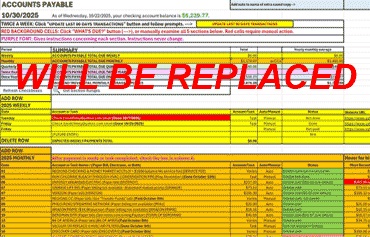
LifeLedger Pro is a comprehensive life management system that runs in Microsoft Excel. It helps you organize your financial accounts, track bills, detect fraud, manage household tasks, and prepare a complete survivor plan - all in one place on your own computer.
Core Features You'll Test:
Financial Management
Import and organize bank transactions, track bills across all payment frequencies, receive fraud alerts for new merchants, get notified of bill increases, and maintain unlimited years of searchable financial history.

Fraud Detection & Alerts
Automatic alerts for new merchants, bill amount changes, autopay amount changes, and charges from cancelled subscriptions.
Tasks & Reminders
Persistent task tracking that keeps items visible until completed, household maintenance schedules, vehicle service reminders, and custom recurring tasks at any frequency.

Survivor Planning Tools
Survivor Tasks with step-by-step guidance for right away, the first 30, 60 and 120 days, and the first year after loss. Includes Social Security survivor benefits calculator and Medicare cost calculator.
Records & Contacts Management
Keep your trusted contacts, the logins for websites that aren't bills, and where your important papers are kept (will, deeds, titles, insurance policies) - all on your own computer.
Security & Privacy
No cloud storage, no bank sign-in, an optional password to open LifeLedger Pro, and a Protection Copy on your flash drive that's updated every time you close LifeLedger Pro.
How Beta Testing Works

Step 1: Check Back Soon
Beta signup is expected to open within about 14 days. Bookmark this page and return soon to join the program.
Step 2: Download & Install
You'll be forwarded right to the download page. Installation takes less than 2 minutes - just download the file, unblock it (the download page shows you how), and double-click it. There is no key to enter. The file is made just for you, so please don't share it with anyone.
Step 3: Use It Daily or Much Less Frequently
Some will open their LifeLedger Pro every day, so they can plan their day from start to finish. The 'Alerts' function will show you everything that you have scheduled for the day. Start organizing your schedule, household finances, bills, tasks, and records. However, some may choose to simply pull a summary of their finances once every few weeks. No obligation or time constraints. How you decide to use your LifeLedger Pro is totally up to you. Note: It is advisable to update your Accounts Payable in LifeLedger Pro more often than every 90 days, or some of the calculations in LifeLedger Pro may not be accurate.
Step 4: Share Feedback
When you find something confusing or encounter a problem, click the "Contact Support" link on the Home tab. Tell us what happened and we'll fix it fast.
Step 5: Get Updates
We'll email you when bug fixes and improvements are ready. Click 'Software Version / Check for Updates' on the 'System Tools' page in LifeLedger Pro and the latest version installs for you.
Step 6: Own It Forever
As a founding member, you receive FREE LIFETIME ACCESS to LifeLedger Pro v1.0. After launch, new users will pay $149.90, but you get version 1 free for life.
Step 7: Spread the Word!
As a 'founding member', we would greatly appreciate you sharing how much LifeLedger Pro benefits your entire life to as many others as possible. You'll find that the benefits of LifeLedger Pro are very substantial, from bill tracking to budgeting, task and reminder scheduling to survivor assistance, LifeLedger Pro is an All-in-One Life Management System.
Beta Testing FAQ
Q: What are the system requirements?
A: LifeLedger Pro requires Microsoft Excel 2013 or newer, or the desktop version of Microsoft 365, on Windows 10 or Windows 11. It works with both 32-bit and 64-bit versions of Excel. Mac is not currently supported.
Q: Is my data secure during beta testing?
A: Absolutely. Your information stays on your own computer - nothing is uploaded to the cloud, and LifeLedger Pro never asks for your bank sign-in. You can also require a password to open LifeLedger Pro.
Q: What happens after the beta testing period?
A: As a founding member beta tester, you receive FREE LIFETIME ACCESS to LifeLedger Pro v1.0. When beta testing ends, simply click 'Software Version / Check for Updates' on the 'System Tools' page in LifeLedger Pro to get the latest version. You own version 1 for life - no payment ever required.
Q: Do I have to provide feedback to participate?
A: Once beta testing opens, we will highly encourage feedback, but there will be no minimum requirement. The more testers share about their experience - especially any problems or confusing features - the better we can make LifeLedger Pro for everyone.
Q: Can I use LifeLedger Pro for my business during beta testing?
A: Yes. LifeLedger Pro is expected to work great for small businesses, consultants, and freelancers. When beta opens, we'd love feedback from business users testing expense tracking, client billing, and new hire training reminders.
Q: What if I decide to stop using LifeLedger Pro?
A: No problem! There's absolutely no obligation to use the app. Simply click the 'Uninstall' button on the LifeLedger Pro home tab.
Q: How many beta testers are you accepting?
A: We'll be limiting beta testing to ensure we can provide quality support and respond to feedback. Bookmark this page and check back soon when signup opens.
Q: Will updates disrupt my work or erase my data?
A: Never. When you click "Check for Updates," your existing data is automatically backed up first. The update process preserves all your bills, transactions, tasks, and records. You'll pick up right where you left off.
Beta Signup Opens Soon
Beta signup is opening soon. Come back shortly for your chance to become a Founding Member, help perfect LifeLedger Pro, and receive FREE LIFETIME ACCESS to version 1.0.
No Excel experience needed • Automatic protection • Zero technical setup
Questions? Contact us - we're happy to help!